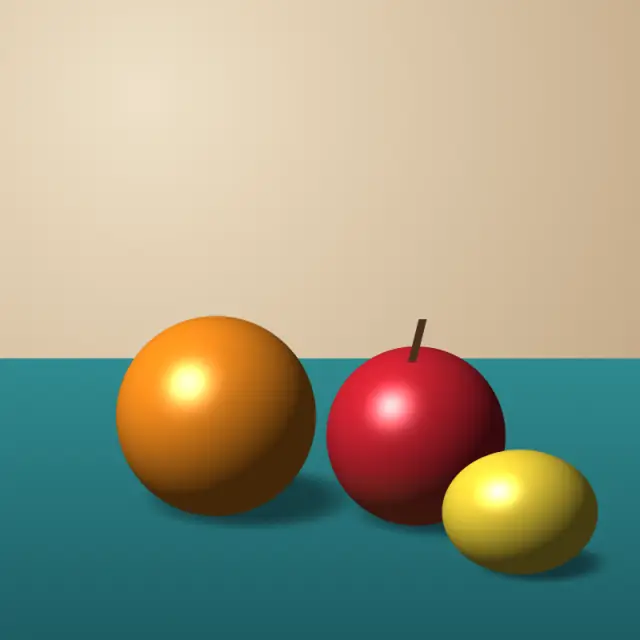
Original illustration
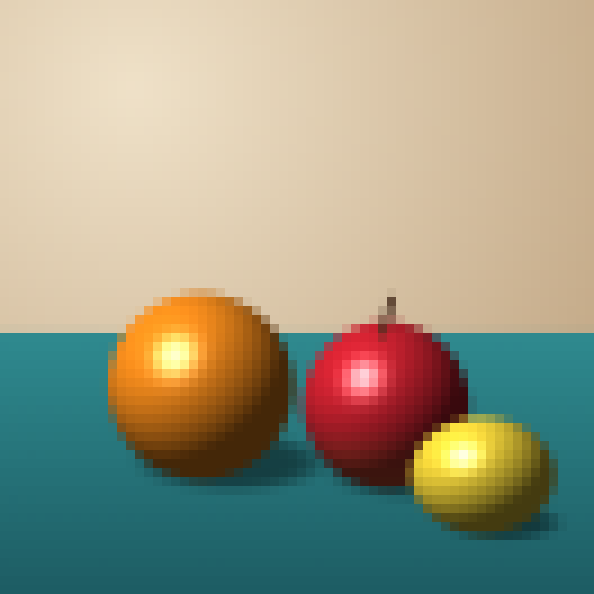
Pixelated, pixel size 12
Add up to 30 images (up to 50 MB each) and pixelate them into a mosaic of square blocks. This page starts with 12-pixel blocks and full 24-bit color, and the slider goes from 1 to 48 pixels with a live preview. The effect applies to the whole image (there is no region selection), the output is a PNG at about the original size, and everything is processed in your browser.
Pixelate images and photos online
Pixelation turns a photo into a mosaic, gives screenshots a retro digital look, or hides detail. This free pixelation tool applies it to your whole image in your browser, and your images are not uploaded.
What is image pixelation?
Pixelation lowers an image's effective resolution so its pixels show as distinct colored blocks. It happens by accident when a small image is stretched. Done on purpose, as here, it replaces fine detail with even, single-colored blocks across the entire image.
The block size decides how much detail disappears. Blocks of 2 to 4 pixels soften the image slightly, and blocks of 16 to 32 pixels turn it into an abstract mosaic. The preview updates as you move the slider.
Hiding faces and sensitive details
People often pixelate faces, license plates, email addresses and phone numbers before sharing an image. Two things to know before relying on it here. First, this tool pixelates the whole image, so to hide one face in a photo you would crop that area out or use another method. Second, pixelation is not a guaranteed way to hide text. Researchers have recovered pixelated text by testing which original text produces the same blocks, especially with small block sizes. For passwords, account numbers and other sensitive text, cover the area with solid color instead, for example with thick strokes of the brush or marker in the image editor.
Pixelation as a design tool
Mosaic effects work well in posters, album covers, social media graphics and website backgrounds. Keeping full color (24-bit) gives a plain mosaic, and switching to a lower bit depth or a retro palette turns it into stylized pixel art.
Choosing a block size
Blocks of 2 to 4 pixels give a light softening that keeps the image clear. At 5 to 10 pixels the retro digital look is obvious but the subject is still easy to recognize. From 11 to 20 pixels faces and text become hard to read, and from 21 to 48 pixels the image turns into an abstract arrangement of color blocks. Because the block size is measured in source pixels, a high-resolution photo needs larger blocks for the same effect.
Pixelation on social media and the web
Some creators use pixelation as a deliberate style for posts. Web developers sometimes show a tiny, blocky version of a large image as a placeholder while the full image loads.
Free and browser-based
There is nothing to install and no account to create. The pixelation runs in a background worker on your device. Each batch takes up to 30 files of up to 50 MB and 64 megapixels each.
Default settings for this tool
Pixelate Image loads pixel size 12 and 24-bit color. Each 12 × 12 block is averaged into one color, but the overall color range is not reduced. Dithering is off. The output keeps about the original size, with every block drawn as a sharp square. The result is always a whole number of blocks, so when the width or height isn't a multiple of 12 the image comes out a few pixels smaller: a 1,000 pixel wide photo becomes 83 blocks, or 996 pixels. Nothing is cut off, because the whole image is fitted into the block grid.
Raise the pixel size to hide faces or text more thoroughly, or lower it to keep the image readable. Choose a lower bit depth or a retro palette only if you want a stylized result instead of a plain mosaic.
Frequently Asked Questions
Can pixelation be reversed to reveal the original image?
Not fully, since the detail inside each block is gone. But it isn't a safe way to hide text: pixelated words and numbers have been reconstructed by matching candidate text against the blocks, especially when the blocks are small. Use large blocks for faces, and cover sensitive text with a solid box instead of pixelating it.
What file formats are supported for pixelation?
JPG, PNG, WebP, BMP, GIF (first frame), AVIF and HEIC, up to 50 MB per file. The output is PNG, which keeps the block edges sharp.
Is my image uploaded to a server when I use this tool?
No. Pixelation runs in your browser, and your images are never uploaded or stored on a server.
What is the difference between pixelation and blur?
Pixelation replaces each group of pixels with one color, which creates visible blocks. Blur mixes neighboring pixels smoothly for a soft, out-of-focus look. Both remove detail, and neither is a reliable way to hide text; a solid box is.