Why resizing blurs pixel art
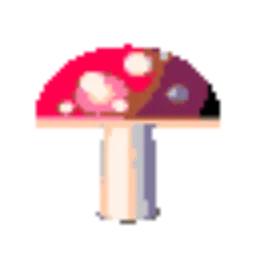
When an image is made larger, the program has to invent the new pixels. Most editors, browsers and phone apps use bilinear or bicubic interpolation, which gives each new pixel a weighted average of the original pixels around it. On a photo that looks smooth and natural. Pixel art is made of hard edges between blocks of flat color, and averaging turns every one of those edges into a soft ramp.
Smooth (bilinear) 4× enlargement
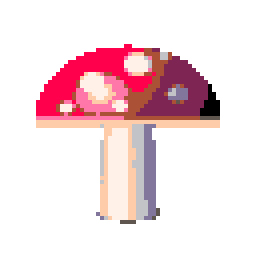
Nearest-neighbor 4× (this tool)
Use nearest-neighbor scaling
Nearest-neighbor interpolation, also called point sampling, gives each new pixel the exact color of the closest original pixel. Nothing is averaged, so no new colors appear and every edge stays hard. Enlarged by 4, each original pixel simply becomes a 4 × 4 square.
Scale by whole numbers
Nearest-neighbor only looks perfect at whole-number factors: 2×, 3×, 4×, 8× and so on. At 1.5× there is no way to split one pixel into one and a half, so some pixels become one pixel wide and others two. The picture stays sharp, but lines that should be even look lumpy. If you need a specific final size, pick the largest whole-number factor that fits and add a border, or crop.
Resize pixel art with our tool
- Open Resize Pixel Art and add your sprites or pixel art images.
- Leave pixel size at 1 and bit depth at 24-bit, the defaults on that page. Your pixels and colors are then kept exactly as they are.
- Pick an Output size of 1×, 2×, 4×, 8× or 16×.
- Download the PNG. With several files you get them all in one ZIP.
The result can be up to 8,192 pixels on its longest side. The tool can also make a GIF or a sprite sheet from several images at the same scale.
Resize pixel art in an image editor
Most editors let you choose the resampling method when you resize.
- In Photoshop, open Image Size and set Resample to Nearest Neighbor (hard edges).
- In GIMP, open Scale Image and set Interpolation to None.
Enter the new size as an exact multiple of the old one, such as 400% or 800%.
Show pixel art sharply on a website
Even a perfectly scaled file is blurred again if the browser has to stretch it. Tell the browser to use nearest-neighbor for that image:
img.pixel-art {
  image-rendering: pixelated;
}
All current major browsers support image-rendering: pixelated. Display the image at a whole-number multiple of its real size, for example a 32 × 32 sprite at 128 × 128 CSS pixels, so every pixel gets the same number of screen pixels. When you draw pixel art on a canvas, set imageSmoothingEnabled = false on its 2D context before calling drawImage.
Making pixel art smaller
Shrinking pixel art removes pixels, so it always changes the drawing. The one exception is art that was enlarged by a whole number earlier. A sprite saved at 4× can go back to its original size without any loss: convert it with pixel size 4 and 24-bit color in any of our pixel art tools, and each 4 × 4 block becomes one pixel again. The low-res image converter does this kind of downscaling for regular images too.
If you are making new pixel art from a photo, the photo to pixel art guide covers pixel size and output size, and the pixel art sizes guide lists common sprite and canvas sizes.